
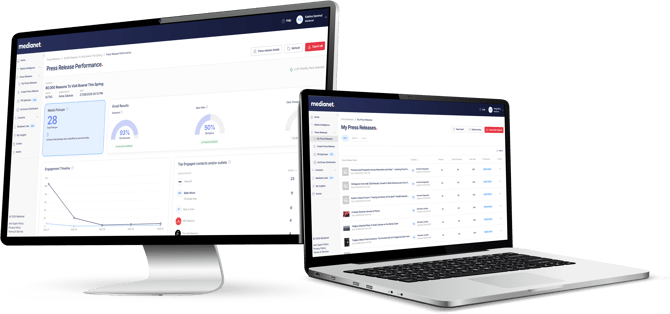
After distributing a press release through Medianet, you can track delivery rates, email opens, link clicks and individual recipient engagement, alongside online media coverage detected by the Media Pickup Tracker.
Accessing your Press Release Performance report
Go to My Press Releases from the menu options and select a sent press release you wish to view.
You can also use the search bar to search for keywords in a press release headline and quickly find a specific release. A Report Ready tag will appear alongside the release once the first detected media pickups are available, typically after 1 hour.
Performance overview
The performance overview provides a snapshot of your results, including media pickups and email results.
The figures for your press release are displayed alongside the Medianet user average for the previous 30 days, giving you a benchmark for comparing your performance.
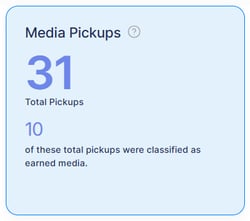
Media Pickups
Media Pickups are based on the content of your distributed press release.
The total includes:
- Website Postings: Instances where your press release has been published in full or substantially reproduced on a media website.
- Earned Media: Coverage likely written by a journalist or media outlet that incorporates content from your press release.
Medianet’s Media Pickup Tracker uses AI technology to scan more than 2,000 Australian media websites for online content that mirrors or incorporates text from your distributed press release.
This provides early insight into the online reach of your story and helps identify earned media coverage without requiring you to manually search individual publications.
Media pickup results will continue to update for 30 days following distribution if additional matching coverage is detected.
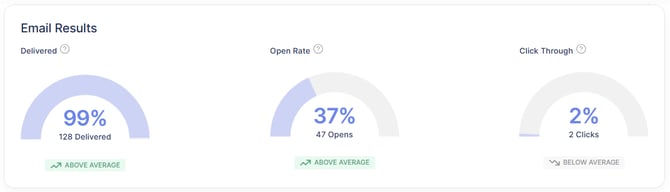
Email Results
Delivered
The percentage of press release emails successfully delivered to recipients, together with a comparison against the Medianet user average.
Open Rate
The percentage of delivered recipients who opened the email at least once, together with a comparison against the Medianet user average.
Open rates can provide an indication of overall engagement with your campaign and whether your headline encouraged recipients to read more.
Please note that some mail servers may open emails automatically. This activity may register as an open even if the recipient has not personally opened the email.
Click Through
The percentage of delivered recipients who clicked a link within the email, together with a comparison against the Medianet user average.
Clicks can help you assess whether recipients took further action, such as visiting a website, opening a linked resource or downloading an attachment.
Please note that some mail servers scan links for security purposes. This activity may register as a click even if the recipient has not personally selected the link.
Editorial Services
The Press Release Performance page will indicate whether your press release was:
- Published on high-authority websites for increased LLM visibility
- Pitched to newsrooms by Medianet’s Editorial Services team.
- Included in Medianet’s daily Press Release Bulletin.
This provides confirmation of the additional editorial support applied to your distribution.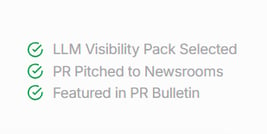
Engagement Timeline
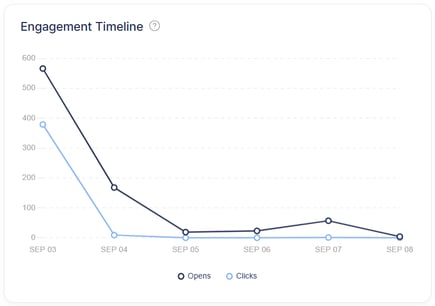
The Engagement Timeline shows email opens and link clicks recorded during the seven days following the distribution of your press release.
This timeline can help you understand when recipients engaged with your release and how engagement developed after it was sent.
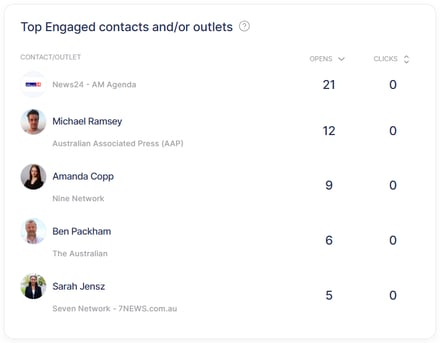
Top Engaged contacts and/or outlets
The Top Engaged section displays the journalists and media outlets that engaged most with your press release through email opens and link clicks.
You can sort the results by the number of Opens or Clicks to identify contacts and outlets that may be suitable for follow-up.
As some email security systems automatically open emails or scan links, engagement data should be used as an indicator rather than confirmation that an individual personally opened or clicked the email.
Media Pickups
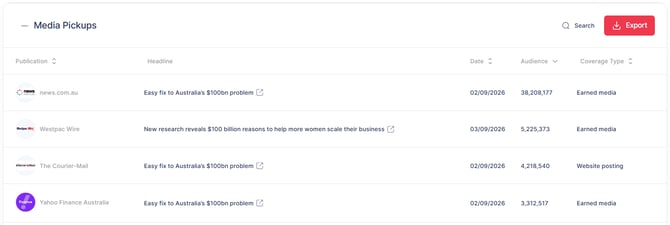
The Media Pickups section displays online coverage detected based on the content of your distributed press release.
Each pickup may include:
- Publication name
- Headline
- Link to the original online article
- Publication date
- Audience number, where available
- Coverage type, either Earned Media or Website Posting
Click the headline to open the original article in a new window. Please note that some news websites may require a paid subscription to access their content.
The Media Pickup Tracker is designed to provide a fast indication of where your press release has appeared online. It may identify both direct publication of your release and journalist-authored articles that use parts of its content.
There is no additional setup required. Media pickup detection begins automatically when you distribute a press release through Medianet and continues updating for 30 days if new matching coverage is found.
Email Performance
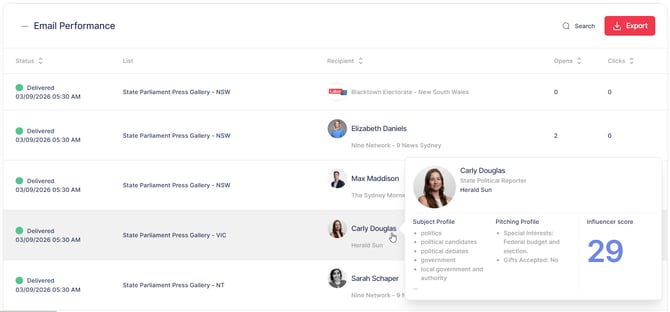
The Email Performance section provides recipient-level information for your distribution, including:
- Delivery status
- Distribution list name
- Recipient name
- Number of opens
- Number of clicks
Delivery statuses
- Delivered: The press release was successfully delivered to the email address.
- Sending: Delivery is still being attempted. Medianet may continue attempting to send the press release for up to 24 hours.
- Failed: The email could not be delivered. This may occur because the email address is invalid, the recipient’s inbox is full, or the destination mail server rejected the message.
If your subscription includes access to the Contacts Database, you can click through to a recipient’s Contact or Outlet profile.
From the profile, you can view further information about the contact or publication and add the contact to one of your saved lists.
Exporting your results
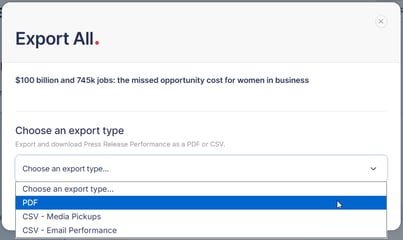
Select the export option at the top of the Press Release Performance page to download:
- Media Pickups as a CSV
- Email Performance as a CSV
- The entire Press Release Performance report as a PDF
CSV exports allow you to sort, filter and further analyse your media pickup or email performance data.
The PDF export combines your results into a convenient report that can be saved or shared with team members and stakeholders.
Using your performance results
Your Press Release Performance report can help you:
- Measure email delivery and recipient engagement.
- Identify journalists and outlets showing the most interest in your story.
- Find opportunities for targeted follow-up.
- Track website postings and early earned media coverage.
- Compare your results with Medianet user averages.
- Export campaign data for further analysis or reporting.